 Reminder Companion
What's new
Every update is free, and the app installs it for you in one click.
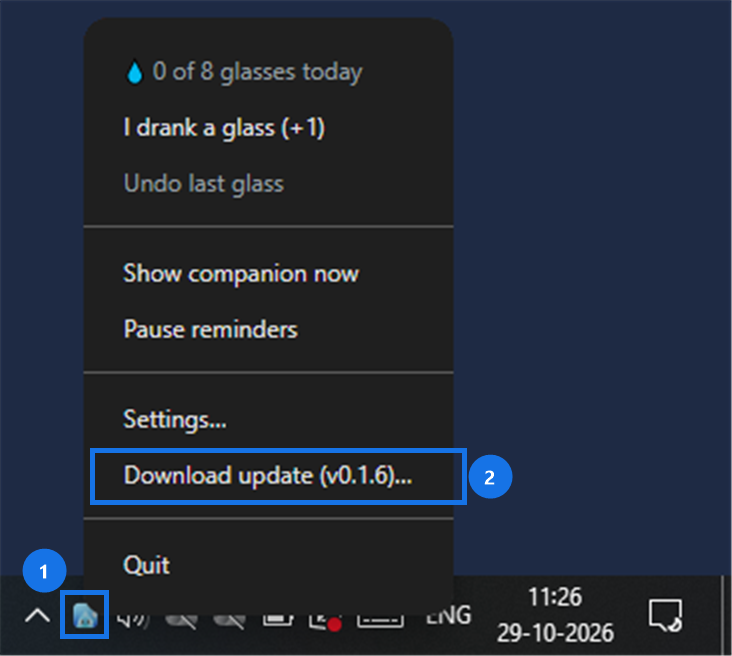
How to update on Windows
- Click Drip in the taskbar tray, at the bottom right next to the clock. Don't see it? Click the ^ arrow to show hidden icons.
- Click Restart to update. The app closes, installs the new version and opens again. Your settings, water history and companions are kept.
If it says Downloading update…, wait a minute and open the menu again.
On a version older than 0.1.5 it says Download update instead (as in the picture): click it, quit the app from the same menu, then open the downloaded file. If Windows says "Windows protected your PC", click More info → Run anyway. After that, every update is one click.
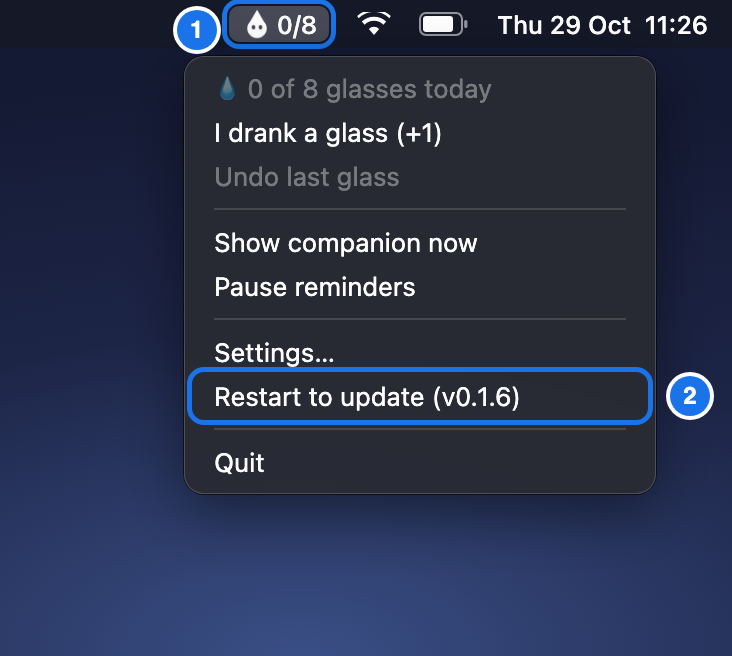
How to update on Mac
- Click Drip in the menu bar, at the top right of your screen. It shows today's water count next to it, like 0/8.
- Click Restart to update. The app closes, installs the new version and opens again. Your settings, water history and companions are kept.
If it says Downloading update…, wait a minute and open the menu again.
On a version older than 0.1.5 it says Download update instead: click it, quit the app from the same menu, open the downloaded file and drag Reminder Companion into Applications, then choose Replace. After that, every update is one click.
Loading versions…